Email Emily
Email Emily
Prompt to Email Template Generator for Marketing Emails
Prompt to Email Template Generator for Marketing Emails
Discipline
Product Design
Timeline
Q3 2025
Deliverable
Shipped AI Feature
TL;DR
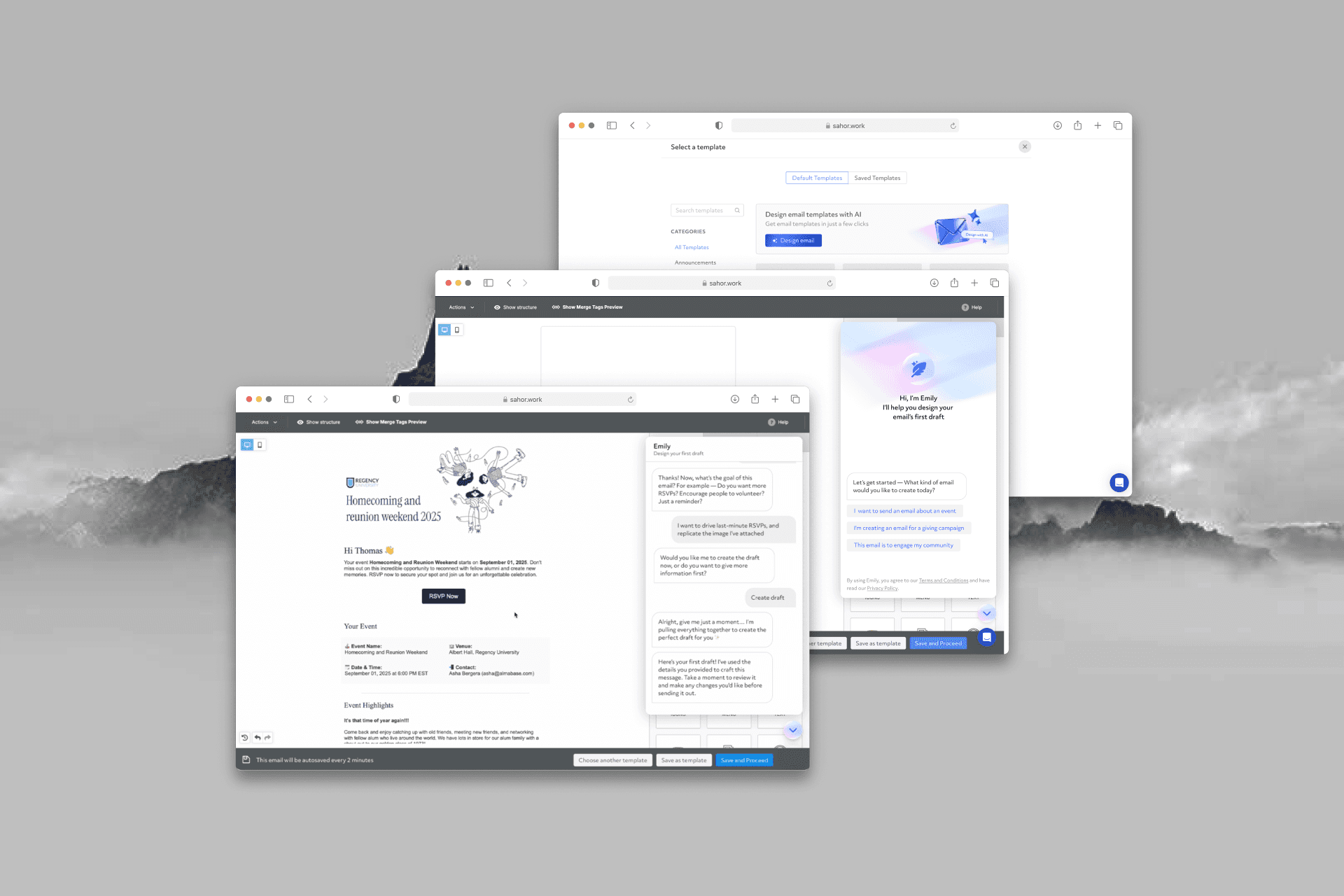
Advancement admins knew what they wanted to say, but building it as an HTML email in BeeFree took them 45+ minutes and design skills most of them didn’t have. I designed Email Emily, an AI assistant that turns a few guided choices into an on-brand draft they can edit. Getting there took two pivots: from a chatbot to guided journeys, then from raw HTML to a structured email schema. Time to a first draft dropped from 45 minutes to about 5.
Advancement admins knew what they wanted to say, but building it as an HTML email in BeeFree took them 45+ minutes and design skills most of them didn’t have. I designed Email Emily, an AI assistant that turns a few guided choices into an on-brand draft they can edit. Getting there took two pivots: from a chatbot to guided journeys, then from raw HTML to a structured email schema. Time to a first draft dropped from 45 minutes to about 5.
Context
Emily started as an internal AI experiment, so I had to find the problem before designing for it.
Almabase’s advancement teams email alumni and donors about events, giving campaigns and community engagement, and they build those emails in BeeFree, the editor inside the product. Because Emily began as an AI productivity experiment rather than a research project, there was no formal discovery phase. I learned how admins worked by talking to Customer Success and reviewing how admins actually built their emails in BeeFree.
I was the product designer on Emily. I shaped the flow, wrote the design rules in the system prompt, and designed Emily’s visual identity and microinteractions.
The problem
Admins knew their message. The 45 minutes went into everything around it.
The same pattern came up again and again. Turning a clear message into a good-looking HTML email took a long sequence of steps, several tools, and design experience most admins didn’t have.
Too many decisions. Layout, hierarchy and spacing choices overwhelmed non-designers.
Too slow. A polished email in BeeFree often took 45+ minutes.
Off brand. Color, hierarchy and spacing rules were hard to apply by hand, so emails drifted from the institution’s brand.

Before Emily: six steps across several tools for every campaign email.
What success meant
Four goals. The second one, trust, turned out to be the hardest.
Reduce cognitive load. Let admins focus on what they want to say, not on design mechanics.
Earn trust. The first draft has to be good enough that admins feel confident clicking Send.
Stay on brand. Colors, CTA styles and hierarchy follow the institution’s brand.
Keep it editable. The draft opens in BeeFree and can be changed without breaking the layout.
First attempt
Da Vinci, a chatbot that asked too many questions.
My first idea was a free-form conversational bot called Da Vinci. It read the admin’s prompt and asked follow-up questions. When is the event? What is the email for? What’s the key message? What details should it include?
In practice it behaved like a typical chatbot. It asked too many questions, often the same ones twice, and took up to 10 minutes to gather context. Even then, the layouts weren’t reliably good.

Da Vinci, the first version: Emily as an open conversation.
A conversation-first flow is too slow and too demanding for a design task.
Guided journeys
Instead of asking questions, Emily offers paths built on data admins already have.
I redesigned the experience as a guided, four-step journey. Emily offers paths for the emails admins send most: Events, Giving Campaigns and Community Engagement. Inside a path, admins pick an existing event or campaign from Almabase and can add a visual reference. Gathering context dropped from about 10 minutes to 3.
Decision
How should Emily collect what it needs?
An open conversation (Da Vinci)
Flexible, but slow: up to 10 minutes of repeated questions.
Guided paths built on existing data
Covers the most common sends and reuses event and campaign details admins already entered.
Trade-off
Emily can’t write every kind of email at launch. Open-ended prompts were left out on purpose.

The guided flow: choose a path, pick the event or campaign, set the goal, then generate.
The turning point
Drafts came back fast, but admins still wouldn’t send them.
The faster flow fixed the UX bottleneck, but the output didn’t hold up. Padding was inconsistent, layouts nested incorrectly, mobile versions were unreadable, colors mapped to the wrong elements and parts of the structure went missing. Speed alone didn’t earn the click on Send.
That pushed me past prompt tweaks and into the architecture. The model was writing raw HTML, which we then converted to BeeFree’s JSON format. HTML lets a model write almost anything, so it did: invalid nesting, broken responsiveness and unstable rendering across email clients.
Every fix exposed another failure. The real problem was the output format, which gave the model too much freedom.
Reading through BeeFree’s documentation, I found SimpleSchema, a JSON model built specifically for email layouts. We rebuilt the pipeline around it.
Pipeline | |
|---|---|
Before | AI model → HTML → BeeFree JSON |
After | AI model → SimpleSchema → custom converter → BeeFree |
Decision
What format should the model write emails in?
Raw HTML
Unlimited freedom, which meant invalid nesting and broken mobile layouts.
SimpleSchema JSON
Limited to valid email structures, so layouts come out consistent and responsive.
Trade-off
We needed our own converter from SimpleSchema to BeeFree.
Layouts became pixel-consistent and reliably responsive, and broken blocks became rare, so admins spent their time editing instead of fixing. This was when Emily went from a novelty to a production-ready tool.
Design rules
With a stable structure, I could write the design rules Emily follows.
I rewrote the system prompt so every draft applies the institution’s primary brand color to CTAs, buttons and graphic blocks, keeps a consistent layout hierarchy, preserves padding and spacing, and pulls the event or giving details into the copy.
To compare changes at scale, we built a prompt testing playground with a system prompt editor that runs the same prompt through the SimpleSchema and HTML pipelines. We tested it across Claude Sonnet, GPT-4o and Gemini 2.5.

Part of the system prompt’s rules, and the playground for comparing outputs across pipelines.
Where Emily lives
Inside Template Selection, where admins already look for layouts.
Instead of launching Emily as a separate tool, I placed it on the Template Selection screen, where admins already go for layout inspiration. Emily appears at the moment they need help, so there’s nothing new to learn.
I gave Emily a minimal, friendly visual identity that stands out without clashing with the product UI. Microinteractions built with component-based keyframe animations make loading, generating and transitions clear.

Emily’s entry point inside Template Selection.
Impact
From 45 minutes to about 5 for a first draft.
5 min
to a first draft, down from 45+
4.5/5
Customer Effort Score
Admins use Emily to mock up quick drafts, then refine them in BeeFree. One customer reported saving about 20 minutes on a single email.
“Useful for mocking up quick drafts. Very quick and easy to use tool.”
— Admin feedback

A homecoming invite drafted by Emily, ready to edit in BeeFree.
What I left out
The first version was narrow on purpose, so its output could be trusted.
Version one excluded three things admins would eventually want:
Fully open-ended prompt-to-email flows
Integration with institutional brand asset libraries
Custom fonts and logo rules
Each one adds inputs the model can get wrong. Leaving them out let us put output quality and reliability first.
Reflection
Designing with AI means designing for uncertainty.
AI models aren’t deterministic. The same prompt behaves differently across models, inputs and architectures, so the work was constant iteration and quick prototypes. Every surprise, from broken HTML to inconsistent color mapping, showed me where the guardrails needed to go.
What I took away is to stay anchored to what the user needs while the technology shifts underneath, and to keep making product decisions when the path isn’t obvious. Structure is what turned the model’s unpredictability into a stable experience.
Next steps
Deeper tuning of the prompt logic
Letting admins choose between AI models
Bringing Emily to other places where emails start
Support for institutional brand asset libraries
A controlled open-ended prompt mode
Context
Emily started as an internal AI experiment, so I had to find the problem before designing for it.
Almabase’s advancement teams email alumni and donors about events, giving campaigns and community engagement, and they build those emails in BeeFree, the editor inside the product. Because Emily began as an AI productivity experiment rather than a research project, there was no formal discovery phase. I learned how admins worked by talking to Customer Success and reviewing how admins actually built their emails in BeeFree.
I was the product designer on Emily. I shaped the flow, wrote the design rules in the system prompt, and designed Emily’s visual identity and microinteractions.
The problem
Admins knew their message. The 45 minutes went into everything around it.
The same pattern came up again and again. Turning a clear message into a good-looking HTML email took a long sequence of steps, several tools, and design experience most admins didn’t have.
Too many decisions. Layout, hierarchy and spacing choices overwhelmed non-designers.
Too slow. A polished email in BeeFree often took 45+ minutes.
Off brand. Color, hierarchy and spacing rules were hard to apply by hand, so emails drifted from the institution’s brand.
Before Emily: six steps across several tools for every campaign email.
What success meant
Four goals. The second one, trust, turned out to be the hardest.
Reduce cognitive load. Let admins focus on what they want to say, not on design mechanics.
Earn trust. The first draft has to be good enough that admins feel confident clicking Send.
Stay on brand. Colors, CTA styles and hierarchy follow the institution’s brand.
Keep it editable. The draft opens in BeeFree and can be changed without breaking the layout.
First attempt
Da Vinci, a chatbot that asked too many questions.
My first idea was a free-form conversational bot called Da Vinci. It read the admin’s prompt and asked follow-up questions. When is the event? What is the email for? What’s the key message? What details should it include?
In practice it behaved like a typical chatbot. It asked too many questions, often the same ones twice, and took up to 10 minutes to gather context. Even then, the layouts weren’t reliably good.
Da Vinci, the first version: Emily as an open conversation.
A conversation-first flow is too slow and too demanding for a design task.
Guided journeys
Instead of asking questions, Emily offers paths built on data admins already have.
I redesigned the experience as a guided, four-step journey. Emily offers paths for the emails admins send most: Events, Giving Campaigns and Community Engagement. Inside a path, admins pick an existing event or campaign from Almabase and can add a visual reference. Gathering context dropped from about 10 minutes to 3.
Decision
How should Emily collect what it needs?
An open conversation (Da Vinci)
Flexible, but slow: up to 10 minutes of repeated questions.
Guided paths built on existing data
Covers the most common sends and reuses event and campaign details admins already entered.
Trade-off
Emily can’t write every kind of email at launch. Open-ended prompts were left out on purpose.
The guided flow: choose a path, pick the event or campaign, set the goal, then generate.
The turning point
Drafts came back fast, but admins still wouldn’t send them.
The faster flow fixed the UX bottleneck, but the output didn’t hold up. Padding was inconsistent, layouts nested incorrectly, mobile versions were unreadable, colors mapped to the wrong elements and parts of the structure went missing. Speed alone didn’t earn the click on Send.
That pushed me past prompt tweaks and into the architecture. The model was writing raw HTML, which we then converted to BeeFree’s JSON format. HTML lets a model write almost anything, so it did: invalid nesting, broken responsiveness and unstable rendering across email clients.
Every fix exposed another failure. The real problem was the output format, which gave the model too much freedom.
Reading through BeeFree’s documentation, I found SimpleSchema, a JSON model built specifically for email layouts. We rebuilt the pipeline around it.
Pipeline | |
|---|---|
Before | AI model → HTML → BeeFree JSON |
After | AI model → SimpleSchema → custom converter → BeeFree |
Decision
What format should the model write emails in?
Raw HTML
Unlimited freedom, which meant invalid nesting and broken mobile layouts.
SimpleSchema JSON
Limited to valid email structures, so layouts come out consistent and responsive.
Trade-off
We needed our own converter from SimpleSchema to BeeFree.
Layouts became pixel-consistent and reliably responsive, and broken blocks became rare, so admins spent their time editing instead of fixing. This was when Emily went from a novelty to a production-ready tool.
Design rules
With a stable structure, I could write the design rules Emily follows.
I rewrote the system prompt so every draft applies the institution’s primary brand color to CTAs, buttons and graphic blocks, keeps a consistent layout hierarchy, preserves padding and spacing, and pulls the event or giving details into the copy.
To compare changes at scale, we built a prompt testing playground with a system prompt editor that runs the same prompt through the SimpleSchema and HTML pipelines. We tested it across Claude Sonnet, GPT-4o and Gemini 2.5.
Part of the system prompt’s rules, and the playground for comparing outputs across pipelines.
Where Emily lives
Inside Template Selection, where admins already look for layouts.
Instead of launching Emily as a separate tool, I placed it on the Template Selection screen, where admins already go for layout inspiration. Emily appears at the moment they need help, so there’s nothing new to learn.
I gave Emily a minimal, friendly visual identity that stands out without clashing with the product UI. Microinteractions built with component-based keyframe animations make loading, generating and transitions clear.
Emily’s entry point inside Template Selection.
Impact
From 45 minutes to about 5 for a first draft.
5 min
to a first draft, down from 45+
4.5/5
Customer Effort Score
Admins use Emily to mock up quick drafts, then refine them in BeeFree. One customer reported saving about 20 minutes on a single email.
“Useful for mocking up quick drafts. Very quick and easy to use tool.”
— Admin feedback
A homecoming invite drafted by Emily, ready to edit in BeeFree.
What I left out
The first version was narrow on purpose, so its output could be trusted.
Version one excluded three things admins would eventually want:
Fully open-ended prompt-to-email flows
Integration with institutional brand asset libraries
Custom fonts and logo rules
Each one adds inputs the model can get wrong. Leaving them out let us put output quality and reliability first.
Reflection
Designing with AI means designing for uncertainty.
AI models aren’t deterministic. The same prompt behaves differently across models, inputs and architectures, so the work was constant iteration and quick prototypes. Every surprise, from broken HTML to inconsistent color mapping, showed me where the guardrails needed to go.
What I took away is to stay anchored to what the user needs while the technology shifts underneath, and to keep making product decisions when the path isn’t obvious. Structure is what turned the model’s unpredictability into a stable experience.
Next steps
Deeper tuning of the prompt logic
Letting admins choose between AI models
Bringing Emily to other places where emails start
Support for institutional brand asset libraries
A controlled open-ended prompt mode

phone.obj
If you’ve scrolled this far,
we should probably talk.
If you’ve scrolled this far,
we should probably talk.
If you’ve scrolled this far,
we should probably talk.
hello@sahor.work
Sahor Debbarma ✤ (WIP 2019 - Present)